

Authentication
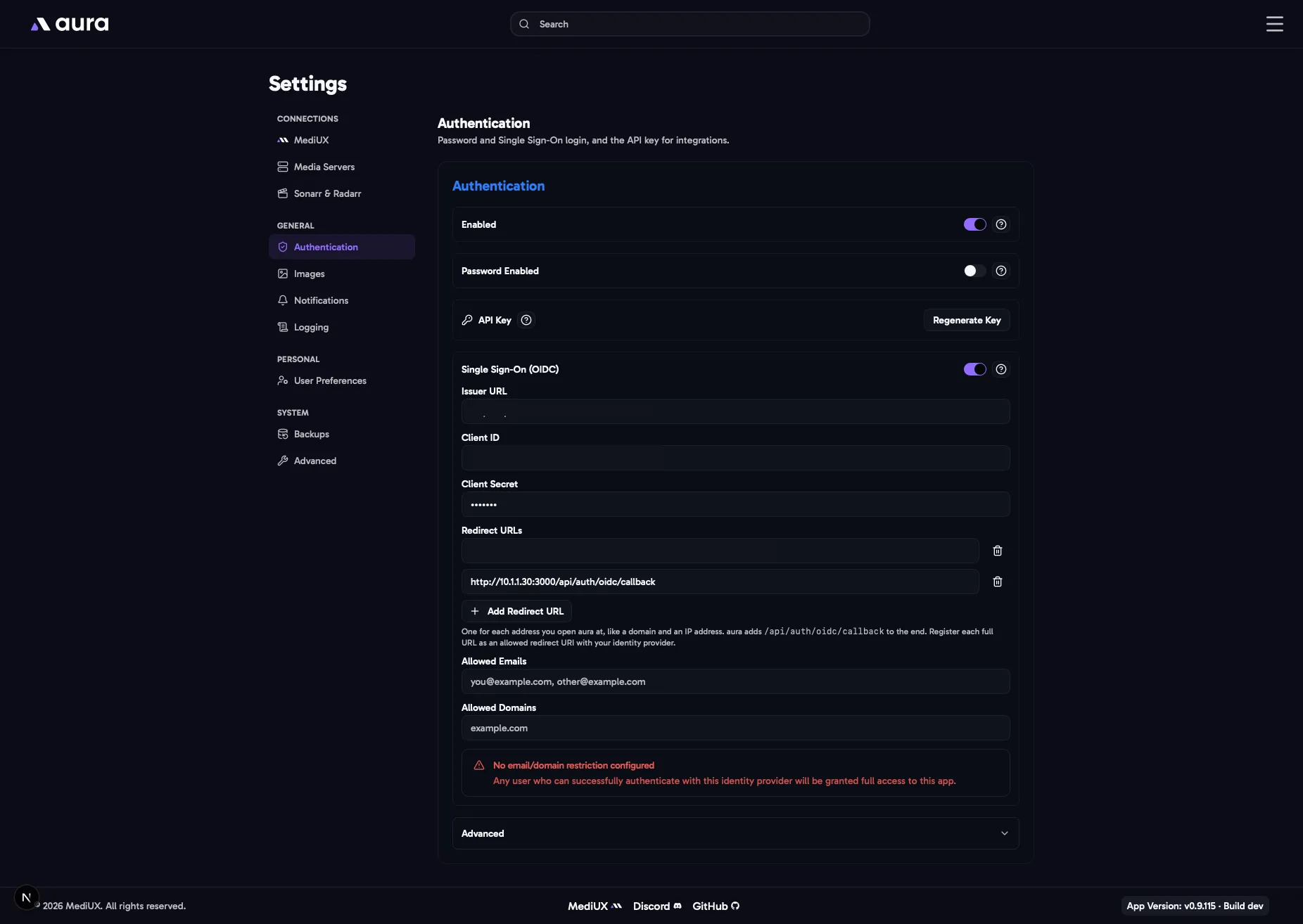
aura has two ways to log in from a browser, a password and Single Sign-On (OIDC), and an API key for scripts and integrations like the Sonarr webhook.
Enabled
Section titled “Enabled”Turn on to require a login before anyone can use aura. You need a way to log in first: a password (below), Single Sign-On, or both.
Password Enabled
Section titled “Password Enabled”Allow logging in with a password. On by default. Turn it off to only log in with Single Sign-On: the password field is removed from the login page, and aura turns away password logins. Single Sign-On must be on to turn the password off.
Argon2id Password Hash
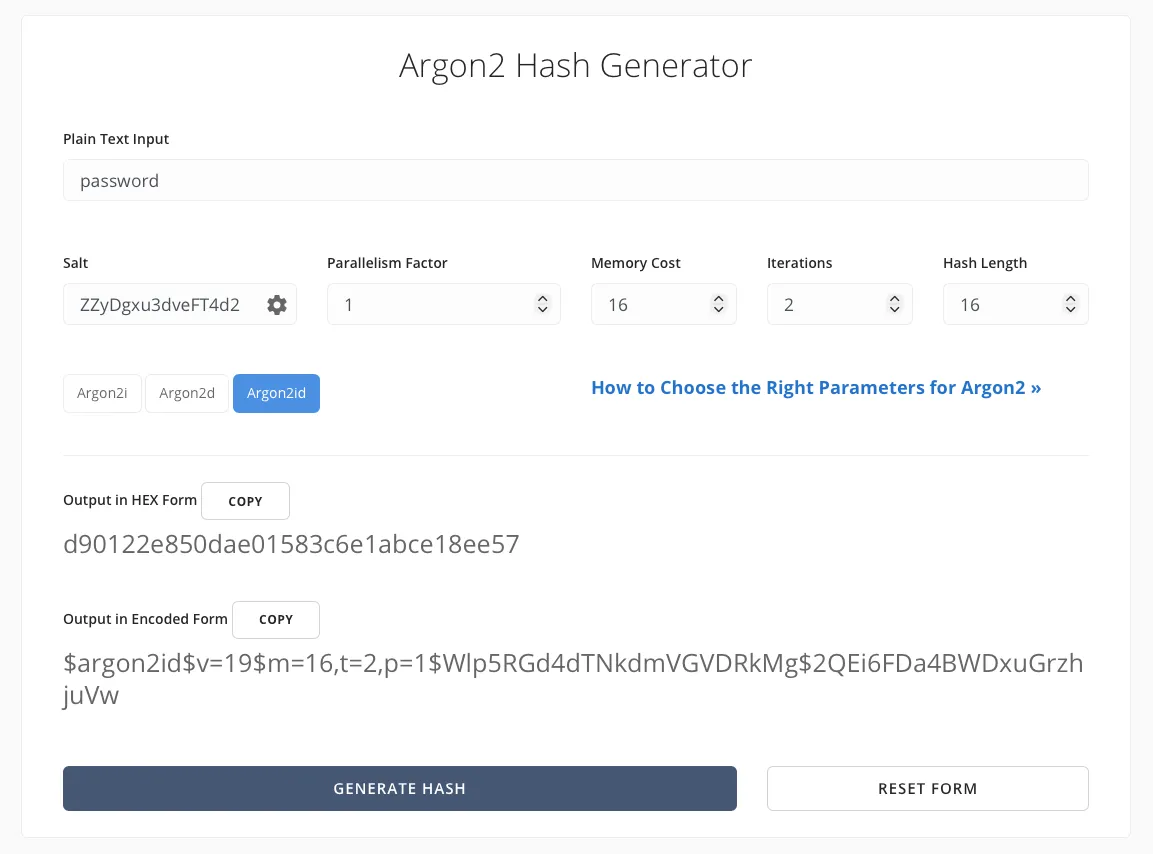
Section titled “Argon2id Password Hash”Only needed while Password Enabled is on. aura doesn’t store your password, only an Argon2id hash of it. To create one:
- Open Argon2.Online (also linked next to the field).
- Type your password, keep the default settings, and generate the hash.
- Paste the result, which starts with
$argon2id$, into the field.
Logging in sets a session cookie in your browser.
API Key
Section titled “API Key”A key for scripts and other apps, such as the Sonarr webhook. Send it in the X-Api-Key header. The API docs let you try the API with your key.
- Click Generate Key to create a key. Copy it straight away, it’s only shown once. aura only stores a hash of it.
- If you lose it, click Regenerate Key. The old key stops working everywhere straight away.
Single Sign-On (OIDC)
Section titled “Single Sign-On (OIDC)”Log in through your own identity provider, such as Authelia, Authentik, Pocket ID or Keycloak. It works alongside the password, or on its own if you turn Password Enabled off.
aura uses PKCE for every login, so a login code that’s intercepted can’t be used. Identity providers that require PKCE, like Authelia or Pocket ID when set to, work without any changes.
- Issuer URL: the base URL of your identity provider, for example
https://idp.example.com. If you paste the/.well-known/openid-configurationaddress instead, aura removes that part for you. - Client ID and Client Secret: from the client you create for aura in your identity provider.
- Redirect URLs: your aura address followed by
/api/auth/oidc/callback, for examplehttps://aura.example.com/api/auth/oidc/callback. Click Add Redirect URL to add one for each address you open aura at, for example a domain and an IP address. You can type just the address, likehttp://192.168.1.50:3000, and aura adds/api/auth/oidc/callbackfor you. aura uses the one that matches the address in your browser, or the first one if none match. Register each full URL with your identity provider. If one points anywhere else, Single Sign-On stays unavailable and saving shows why. - Allowed Emails and Allowed Domains: who may log in. Separate entries with commas.
Advanced
Section titled “Advanced”These are only needed in unusual setups. Leave them at their defaults unless logging in doesn’t work.
Session Cookie Secure
Section titled “Session Cookie Secure”Whether the login cookie is marked Secure, so the browser only sends it over HTTPS.
- Auto (default, recommended): Secure when you open aura over HTTPS, and not over plain HTTP. This is what most home setups, such as
http://192.168.1.50:3000, need. - Always: always Secure. Logging in over plain HTTP will silently fail.
- Never: never Secure.
Trust Reverse Proxy for HTTPS
Section titled “Trust Reverse Proxy for HTTPS”Treats requests as HTTPS when a reverse proxy says so with the X-Forwarded-Proto header. Turn this on if aura is behind a reverse proxy like Nginx or Traefik that handles HTTPS, and logging in doesn’t stick. Only turn it on if your proxy always sets this header, as otherwise it can be faked.
Allowed Origins
Section titled “Allowed Origins”Other websites allowed to call the aura API with your login, for example a dashboard on another domain. It’s not needed when you use aura normally.
Locked Out?
Section titled “Locked Out?”If you forget your password or your identity provider breaks, set the AURA_DISABLE_AUTH=true environment variable and restart aura. Log in, fix your authentication settings, then remove the variable and restart aura again. While it’s set, anyone who can reach aura can use it.
In the Config File
Section titled “In the Config File”Auth: Enabled: true PasswordEnabled: true # false to only log in with Single Sign-On Password: YOUR_ARGON2ID_HASH SessionCookieSecure: auto # auto, always or never TrustProxyForCookieSecure: false AllowedOrigins: [] OIDC: Enabled: true IssuerURL: https://idp.example.com ClientID: aura ClientSecret: YOUR_OIDC_CLIENT_SECRET RedirectURLs: - https://aura.example.com/api/auth/oidc/callback - http://192.168.1.50:3000/api/auth/oidc/callback AllowedEmails: - you@example.com AllowedDomains: - example.comThe API key isn’t set in the config file. Generate it in Settings. Importing a config file doesn’t change it.